
Build
Learn to 3D print. Then make it yours.
From never touching a printer to printing, designing and selling your own things. Step by step, every fact linked to the page it came from.
Sections
- Start hereWhat it is, FDM or resin, the real costs, and a 30-minute path to your first print.
- Choose a printerBy budget and by what you want to make, with the makers' own specs and the safety differences.
- LearnSet up, slice, materials, fixing problems, finishing and designing your own.
- ProjectsJewellery, home, gifts, repairs and accessibility aids, each with steps and files.
- Sell what you makeLicences, marketplace fees, product safety in the UK and US, and pricing your time.
- Places and peopleMakerspaces, libraries with printers and women's maker groups, by country.
- GlossaryEvery word in plain English.




Things to make first
All projects- Earrings, charms and pendantsJewellery
- Makeup, brush, lipstick and nail polish organisersBeauty
- Earring stands, jewellery racks and a ring dishJewellery storage
- Claw clips, hair clips and hair holdersHair
- Bag charms and keyringsCharms
- Vanity and desk organisers, and a stand for tutorialsVanity and desk
- Planters and small decorHome decor
- Gifts: personalised ornaments and keepsake boxesGifts







Never printed before?
Your first print in 30 minutes
From the box to the first layer. The print itself takes longer; your slicer tells you how long.
Minutes 0 to 5: place it
Stable, level surface; well ventilated room; space around it.
Sources: ELEGOO (Maker's guide); University of Edinburgh Health and Safety Department (Official safety guidance)Minutes 5 to 20: set it up
Follow the quick start. The A1 mini is pre-assembled and the maker counts about 20 minutes to the first print; the CORE One+ runs a one-time automatic calibration.
Sources: Bambu Lab (Maker's spec); Prusa Research (Maker's spec)Minutes 20 to 25: load PLA and clean the plate
PLA is the easy one to start with. Wipe the plate with 90% IPA.
Sources: Prusa Knowledge Base, PLA (material guide) (Maker's guide); Prusa Knowledge Base, First layer issues (Maker's guide)Minutes 25 to 30: slice and start
Open a small, flat model in your free slicer, pick your printer and the PLA preset, 0.2 mm layers, about 15% infill, slice, preview, print.
Source: Prusa Knowledge Base (Maker's guide)Then: watch the first layer
Stay for the first layer. Even, no gaps, no ridges: walk away. Otherwise stop, and see Fix it.
Source: Prusa Knowledge Base (Maker's guide)
Design your own
From your picture to a file you can print
Design from your own picture, on this site: upload, choose a size, and get a file to print at home or send to a print service.
Designed by our founder
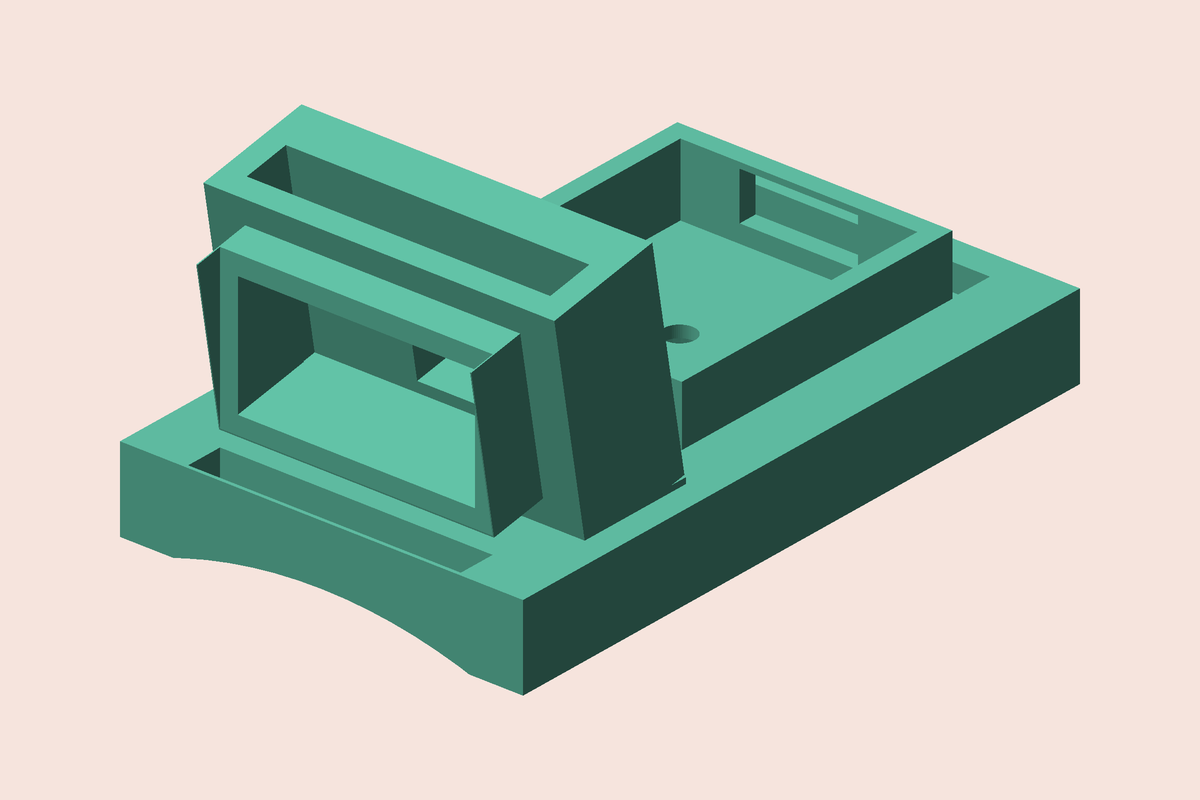
Worked example: a wrist mount for a depth sensor
A parametric mount that sits on the wrist and holds a small distance sensor, a microcontroller board and a coin vibration motor. A maker project, not a medical device.
Nothing here has been printed or tested by Women With Tech: every fact links to the page it came from, labelled by who published it. How we make money. Checked 10 November 2026.
DYOR: do your own research. Product links are suggested by AI or our community and checked with agents before they appear. We have not tested these products. Prices and availability can change. If a link ever earns us money, it will say so. Disclosures
Sources
Each page was opened by our page reader on the date shown. Pages change: check the source before you rely on it.
- Get started in resin printing. ELEGOO. Maker's guide. Read 10 November 2026.
- Guidance on 3D printers (based on HSE research report RR1146). University of Edinburgh Health and Safety Department. Official safety guidance. Read 10 November 2026.
- A1 mini product page. Bambu Lab. Maker's spec. Read 10 November 2026.
- Prusa CORE One+ (Gen 2). Prusa Research. Maker's spec. Read 10 November 2026.
- PLA (material guide). Prusa Knowledge Base. Maker's guide. Read 10 November 2026.
- First layer issues. Prusa Knowledge Base. Maker's guide. Read 10 November 2026.
- First print with PrusaSlicer. Prusa Knowledge Base. Maker's guide. Read 10 November 2026.
- First Layer Calibration (MINI/MINI+). Prusa Knowledge Base. Maker's guide. Read 10 November 2026.